
In the digital landscape of 2026, speed is no longer just a luxury—it is a fundamental requirement for survival. With users expecting near-instantaneous load times, even a delay of a few milliseconds can lead to a significant drop in conversion rates and SEO rankings. Persistent caching stands out as the gold standard for achieving lightning-fast performance, ensuring that your server doesn’t have to work overtime to serve the same content repeatedly, making it a cornerstone of effective web performance optimization (WPO).
By moving beyond basic browser caching and embracing persistent, server-side, and distributed caching strategies, you can transform your website into a high-performance engine. This guide will walk you through the technical implementation of persistent caching, helping you optimize your infrastructure for the modern web.
Understanding the Core of Persistent Caching
At its heart, persistent caching refers to storing processed data in a high-speed memory layer or disk storage that persists across multiple user requests and even server restarts. Unlike temporary sessions that clear upon logout, persistent caches ensure that heavy database queries or complex rendering tasks are executed only once.
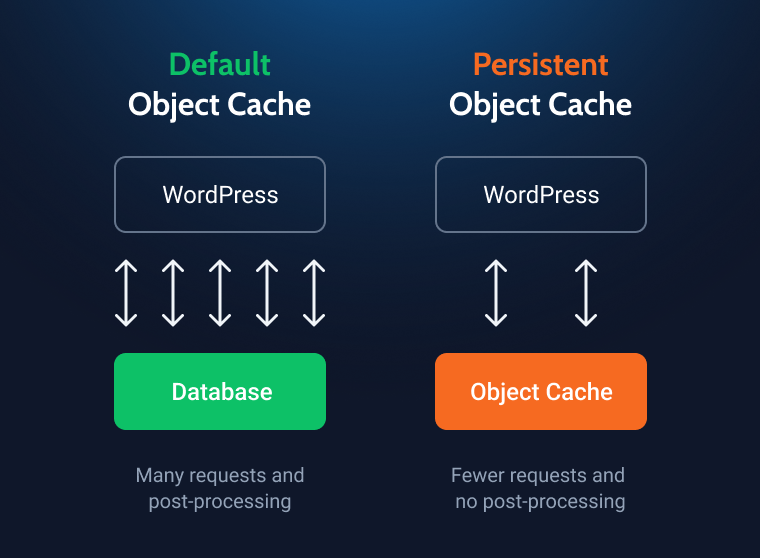
When a user visits your site, the server typically performs several operations: fetching data from a database, executing PHP scripts, and assembling HTML. With persistent caching, the result of these operations is stored in a storage engine like Redis or Memcached. The next time a visitor arrives, the server bypasses the expensive computation phase and serves the pre-rendered content directly from the cache, drastically reducing server response time.
Why Persistent Caching Matters in 2026
Reduced Time to First Byte (TTFB): By eliminating database bottlenecks, you significantly lower your TTFB and improve Time to Interactive (TTI), both critical Google Core Web Vitals.
Scalability: Persistent caching allows your infrastructure to handle traffic spikes during sales or viral events without increasing your CPU and RAM expenditure, making it a powerful scalability solution.
Improved User Experience (UX): Faster load times correlate directly with lower bounce rates and higher engagement across all devices.
Implementing Server-Side Object Caching
Object caching is the most effective way to optimize dynamic websites, especially those built on platforms like WordPress, Drupal, or custom frameworks, by enabling efficient dynamic content caching. Instead of caching the entire page, you cache the individual results of database queries.
Setting Up Redis for Optimal Performance
Redis is the industry standard for persistent object caching in 2026. It is an in-memory data structure store that is incredibly fast and supports complex data types.
- Install the Redis Server: On a Linux-based server, use your package manager (e.g., `sudo apt install redis-server`).
- Configure Persistence: Ensure your `redis.conf` file is configured with Append Only File (AOF) or RDB snapshots to ensure data persists through power cycles.
- Connect Your Application: Use a specialized plugin or library (such as Redis Object Cache for WordPress) to point your application to the Redis socket or local port.
- Monitor Hit Rates: Use tools like `redis-cli monitor` to track your cache hit ratio. A healthy cache should aim for a hit rate of 80% or higher.
Leveraging Distributed Caching for Global Reach
If your website serves a global audience, storing cache on a single server is not enough. You need distributed caching, which pushes your content to the “edge” of the network, closer to where your users are actually located.
The Role of CDN-Integrated Persistent Caching
Modern Content Delivery Networks (CDNs) have evolved into “Edge Compute” platforms. By implementing persistent caching at the CDN level (often called Edge Caching), you can serve static and dynamic assets from a data center that is physically closer to the user.
Cache-Control Headers: Use precise headers like `s-maxage` and `stale-while-revalidate` to instruct the CDN on how long to keep items in the cache.
Purge APIs: Integrate your CMS with the CDN’s Purge API. When you update a post, the system automatically clears the specific cached URL globally, ensuring users always see the latest version.
Static Asset Offloading: Offload your CSS, JavaScript, and images to the CDN to reduce the load on your origin server to near zero for those specific files.
Database Query Optimization and Caching
Even with persistent object caching, poorly optimized database queries can still create friction, highlighting the need for comprehensive backend optimization. Before caching, you must ensure your queries are as efficient as possible.
Best Practices for Query Caching
Indexing: Ensure that every field used in a `WHERE` or `JOIN` clause is properly indexed in your SQL database.
Fragment Caching: If you have a complex sidebar or a footer that pulls data from multiple sources, use fragment caching to store just that specific piece of HTML.
Avoid Over-Caching: Caching everything can lead to “cache bloat,” where your server spends more time managing the cache than serving content. Cache only the expensive queries that run frequently.
Monitoring and Maintaining Your Cache Strategy
A caching strategy is not a “set it and forget it” task. In 2026, the complexity of web traffic requires continuous monitoring to ensure your cache is providing value rather than serving stale content.
Key Metrics to Track
- Cache Hit Ratio: The percentage of requests served from the cache versus the origin server.
- Cache Eviction Rate: If this is too high, it means your cache size is too small, and items are being deleted before they can be reused.
- Latency Improvements: Compare your TTFB before and after enabling persistent caching. Most sites see a 30% to 60% reduction in latency.
The Importance of Cache Invalidation
The biggest challenge in persistent caching is invalidation. If a user updates their profile or changes a product price, the cache must reflect that change immediately. Implement a robust “Cache Invalidation Strategy” using tags or events. When a database entity is updated, trigger a hook that deletes only the relevant cache keys, rather than flushing the entire cache.
Why Persistent Caching is the Future of Web Performance
As we move deeper into 2026, the web is becoming increasingly dynamic. AI-driven personalization and real-time data updates mean that “static” pages are becoming a rarity. Persistent caching is the bridge between the need for dynamic content and the requirement for sub-second load times.
By combining in-memory object caching (Redis), edge distribution (CDNs), and intelligent invalidation, you create a resilient architecture. This setup not only improves your search engine rankings but also significantly enhances the user experience, leading to higher customer retention and increased revenue.
Final Checklist for Implementation
[ ] Audit your current database performance.
[ ] Install and secure a Redis or Memcached instance.
[ ] Configure your application to use the caching layer.
[ ] Set up a CDN with edge caching enabled.
[ ] Establish a purge mechanism for content updates.
[ ] Monitor performance metrics for 30 days and iterate.
The journey to a faster website is continuous. By mastering persistent caching, you are ensuring that your digital footprint remains competitive, responsive, and ready for the demands of the modern internet user. Start small, test frequently, and watch your metrics soar.
Delving Deeper into Advanced Caching Strategies
While the concept of persistent caching broadly involves storing data for quicker retrieval, the implementation can vary significantly based on the type of content and the desired level of granularity. Moving beyond simple full-page caching, understanding advanced strategies is crucial for optimizing diverse web applications.
1. Object Caching: This strategy focuses on caching specific data objects, such as database query results, API responses, or computationally expensive function outputs. Instead of rebuilding these objects for every request, they are retrieved directly from the cache. For instance, if your website displays a list of popular products, the query to fetch these products can be cached. When a user visits the page, the application first checks the cache; if the data is present, it’s served instantly without hitting the database, drastically reducing database load and response times. This is particularly effective for dynamic content that doesn’t change frequently but is expensive to generate. Popular ORMs and frameworks often integrate object caching layers, allowing developers to cache model instances or query sets with minimal effort.
2. Fragment Caching: This technique takes granularity a step further by caching individual components or “fragments” of a web page. Imagine a complex e-commerce product page with a static header, a dynamic product description, user reviews, and a personalized “related items” section. Fragment caching allows you to cache the header and product description separately, while the more dynamic sections are generated on the fly or cached with shorter lifespans. This hybrid approach offers a powerful balance between performance and freshness, ensuring that stable parts of a page are always fast, without over-caching highly personalized or frequently updated elements. It’s often implemented by wrapping specific template partials or view components with caching logic.
3. Browser Caching (Leveraging HTTP Headers): While primarily client-side, effective browser caching is an indispensable complement to server-side persistent caching. By sending appropriate HTTP `Cache-Control` and `Expires` headers, web servers can instruct browsers to store static assets (like images, CSS, JavaScript files, and fonts) locally for a specified duration. Subsequent visits to the same or other pages using these assets will load them directly from the user’s browser cache, bypassing server requests entirely. This significantly reduces server load, bandwidth usage, and perceived page load times for returning visitors, leading to substantial database load reduction.
The Art of Cache Invalidation: Ensuring Freshness
Persistent caching’s greatest strength — storing data for fast retrieval — can also be its biggest challenge if not managed correctly. Stale data can lead to incorrect information being displayed, frustrating users and potentially impacting business operations. Effective cache invalidation is therefore as critical as the caching itself.
1. Time-Based Expiration (TTL): The simplest form of invalidation involves setting a Time-To-Live (TTL) for each cached item. After this duration, the item is automatically removed or marked as stale, forcing the system to regenerate it on the next request. This is suitable for content that has a predictable refresh cycle or where a slight delay in freshness is acceptable (e.g., news feeds, social media timelines). However, it can lead to periods of stale data if content changes before the TTL expires, or unnecessary regenerations if content hasn’t changed but the TTL runs out.
2. Event-Driven Invalidation: For mission-critical data that must always be fresh, event-driven invalidation is superior. This strategy triggers cache removal or update whenever the underlying source data changes. For example, if a product’s price is updated in the database, an event listener can immediately invalidate the cached version of that product page or object. This ensures real-time consistency. Implementing this often involves hooks within your application’s data layer, message queues (like RabbitMQ or Kafka) to broadcast invalidation events, or direct calls to the cache system’s `delete` function upon data modification. While more complex to set up, it provides the highest level of data accuracy.
3. Tag-Based Invalidation: This powerful technique allows you to associate multiple cache items with one or more “tags.” For instance, all cached pages related to “Category X” could be tagged `categoryX`. If a new product is added to Category X, you can invalidate all items associated with the `categoryX` tag with a single command. This is incredibly efficient for managing groups of related content without having to individually track and delete hundreds or thousands of specific cache keys. Many advanced caching systems like Varnish and some Redis client libraries support tag-based invalidation, significantly streamlining content updates for large-scale sites.
4. Cache Busting for Static Assets: For assets like CSS, JavaScript, and images, a technique called “cache busting” is commonly used. Instead of invalidating browser caches, which can be unreliable, you simply change the filename or add a unique query string parameter to the asset’s URL whenever its content changes (e.g., `style.css?v=1.2.3` or `style.c2a7f8.css`). Because the URL is new, browsers treat it as a completely new resource and download the updated version, bypassing any old cached versions. This ensures users always get the latest version of your site’s styling and functionality without needing to clear their browser cache manually.
Monitoring and Optimizing Your Caching Layer
Implementing persistent caching is just the first step; continuous monitoring and optimization are essential to realize its full benefits. Without proper oversight, a caching layer can become a black box, potentially serving stale data or failing to deliver expected performance gains.
Key Metrics to Track:
Cache Hit Rate: The percentage of requests served from the cache versus those that had to hit the origin server. A high hit rate (ideally 80%+) indicates effective caching. A low hit rate suggests either content isn’t being cached effectively, TTLs are too short, or too many unique requests are bypassing the cache.
Cache Miss Rate: The inverse of the hit rate, indicating how often the cache failed to provide data.
Eviction Rate: The frequency at which items are being removed from the cache due to memory limits. A high eviction rate means your cache is too small or your caching policy needs adjustment.
Latency: The time it takes to retrieve data from the cache. This should be consistently low (milliseconds).
Memory Usage: How much memory your cache store is consuming. Crucial for capacity planning.
Network I/O: The data transfer rate to and from your cache server.
Tools for Monitoring:
Modern caching solutions like Redis and Memcached come with built-in monitoring commands (e.g., `INFO` command in Redis). For more comprehensive insights, integrate with dedicated monitoring platforms:
Prometheus and Grafana: Open-source tools for time-series data collection and visualization, widely used for infrastructure monitoring.
New Relic, Datadog, Dynatrace: Commercial Application Performance Monitoring (APM) solutions that offer deep insights into caching performance, often integrating with your application code and cache servers.
CDN Analytics: If using a CDN, their dashboards provide excellent insights into edge cache hit rates, traffic offload, and global performance.
Interpreting Data and Optimizing:
A low cache hit rate might indicate that too many requests have unique parameters preventing caching, or that your invalidation strategy is too aggressive. Consider normalizing URLs or increasing TTLs where appropriate.
High eviction rates signal that your cache might be undersized or that you’re attempting to cache too much non-essential data. Review your caching policies and potentially scale up your cache infrastructure.
Spikes in latency could point to network issues, an overloaded cache server, or inefficient cache key design.
Security and Reliability in Persistent Caching
While performance is paramount, neglecting security and reliability in your caching layer can introduce significant vulnerabilities and instability.
1. Handling Sensitive Data: Never cache user-specific sensitive data (e.g., personally identifiable information, financial details) in a shared, unencrypted cache. If sensitive data must be cached, ensure it’s encrypted at rest and in transit, and that access controls are strictly enforced. Preferably, cache only public or anonymized data, or ensure any cached personalized data is associated with a unique, non-guessable user session key and has a very short TTL.
2. DDoS Protection and Cache Stampede: A robust caching layer can act as a frontline defense against DDoS attacks by absorbing a large volume of requests without hitting your origin servers. However, it’s crucial to protect the cache itself.
Cache Stampede: This occurs when a cached item expires, and multiple simultaneous requests for that item all miss the cache, subsequently hitting the backend server to regenerate the data. This can overwhelm the backend, leading to performance degradation or even outages. Solutions include:
Mutex Locks: Only one request is allowed to regenerate the item, while others wait.
Probabilistic Caching (Thundering Herd Protection): Set a short “soft” TTL before the actual “hard” TTL. When the soft TTL expires, only one request is chosen to refresh the cache in the background, while others continue to be served the slightly stale (but still available) data.
Pre-fetching/Warm-up (also known as cache warming): Proactively refresh popular cache items before they expire.
3. Redundancy and Failover: For critical applications, a single cache instance is a single point of failure. Implement high availability for your caching infrastructure:
Redis Sentinel: Provides automatic failover for Redis instances, electing a new master if the current one fails.
Redis Cluster: Shards data across multiple Redis nodes, offering both horizontal scaling and high availability.
Memcached Replication: While Memcached itself doesn’t offer native replication, client libraries can be configured to distribute data across multiple servers, and your application can handle retries if a node fails.
The Broader Impact: SEO, User Experience, and Business Growth
The benefits of persistent caching extend far beyond just faster load times, directly influencing critical aspects of your website’s success.
1. Enhanced SEO and Core Web Vitals: Google explicitly uses page speed as a ranking factor, and its Core Web Vitals (Largest Contentful Paint, First Input Delay, Cumulative Layout Shift) are heavily influenced by how quickly and smoothly your content loads. Persistent caching dramatically improves LCP by ensuring key content is delivered almost instantly. It can also positively impact FID by freeing up server resources sooner, allowing the browser to process user interactions faster. Websites that meet Google’s Core Web Vitals often see improved search rankings, leading to higher organic traffic. Statistics show that improving page speed by even a fraction of a second can significantly move the needle in search engine results.
2. Superior User Experience and Retention: In an era where attention spans are fleeting, a fast website is non-negotiable. Users expect immediate gratification; studies consistently show that a 1-second delay in page load time can lead to a 7% reduction in conversions, an 11% fewer page views, and a 16% decrease in customer satisfaction. By delivering content at lightning speed, persistent caching reduces bounce rates, encourages deeper engagement, and fosters a positive user experience that builds trust and loyalty. This translates directly into higher user retention and repeat visits.
3. Significant Cost Savings and Scalability: By offloading requests from your application servers and databases to a highly optimized cache, you reduce the computational resources required to serve your website, optimizing resource utilization. This means you can handle more traffic with the same infrastructure, or even scale down your backend servers, leading to substantial cost savings on hosting, database licenses, and infrastructure maintenance. Furthermore, a robust caching layer provides an essential buffer during traffic spikes, allowing your site to gracefully handle sudden surges in visitors without collapsing under load, ensuring continuous availability and a seamless experience even during peak demand.
Conclusion
The journey to a faster website is continuous. By mastering persistent caching, you are not merely optimizing for speed; you are investing in a resilient, scalable, and user-centric digital presence. From understanding the nuances of advanced caching strategies and perfecting cache invalidation to diligently monitoring performance and fortifying your caching layer against security threats, each step contributes to a website that is not only competitive but truly exceptional.
Embrace the iterative process: start by identifying your slowest pages, implement a targeted caching strategy, test its impact on Core Web Vitals and user engagement, and then refine. The metrics you track will tell a clear story, guiding your path to a website that loads instantly, delights users, and stands ready for the ever-increasing demands of the modern internet. Your digital footprint will remain competitive, responsive, and poised for sustained growth.