
In the rapidly evolving world of containerization, data persistence remains the cornerstone of enterprise-grade applications. As we move through 2026, the “ephemeral” nature of containers—where data vanishes once a container is deleted—is no longer a hurdle but a design choice that supports immutable infrastructure and requires expert management.
Managing persistent storage in Docker is no longer just about mounting a folder; it is about orchestrating stateful applications and workloads across hybrid clouds and high-performance NVMe arrays. Whether you are running a high-traffic PostgreSQL database or a machine learning model pipeline, understanding how to manage volumes effectively is critical for system reliability.
This comprehensive Step-by-step guide to persistent volume management in Docker provides a deep dive into Docker persistent volume management, updated with the latest 2026 standards, security protocols, and performance optimizations.
1. Understanding the Docker Storage Landscape in 2026
Before diving into the commands, we must distinguish between the three primary ways Docker handles storage. In 2026, the industry has shifted heavily toward Volumes over Bind Mounts due to their superior integration with cloud-native APIs.
Volumes (The Gold Standard)
Volumes are stored in a part of the host filesystem which is managed by Docker (`/var/lib/docker/volumes/` on Linux). They are the best way to persist data in Docker because they are isolated from the core functionality of the host machine, ensuring excellent data portability.
Bind Mounts
Bind mounts rely on the directory structure and OS of the host machine. While still used for development (like hot-reloading code), they are increasingly discouraged in production due to security risks and file permission conflicts.
Tmpfs Mounts
Stored only in the host system’s memory, tmpfs mounts are used for sensitive data or non-persistent state information that requires high-speed access without the overhead of disk I/O.

2. Step-by-Step: Creating and Managing Docker Volumes
This section offers a practical Step-by-step guide to persistent volume management in Docker, focusing on creating and managing Docker volumes. Managing volumes in 2026 is streamlined thanks to the enhanced Docker CLI. Follow these steps to initialize and inspect your persistent storage layer.
Step 1: Creating a Named Volume
To create a volume manually before deploying a container, use the `create` command. This allows you to pre-configure labels and drivers.
bash
docker volume create --name myenterprisedata
Pro Tip: In 2026, it is standard practice to use labels for metadata, helping automated cleanup scripts identify which volumes belong to specific projects.
Step 2: Inspecting Volume Metadata
To understand where your data lives and what driver it uses, the `inspect` command is your best friend.
bash
docker volume inspect myenterprisedata
The output provides the Mountpoint, which is the physical location of the data on the host. This is crucial for troubleshooting storage bottlenecks or performing manual backups.
Step 3: Listing and Filtering Volumes
As your environment grows, you may have hundreds of volumes. Use advanced filtering to find what you need:
bash
docker volume ls --filter dangling=true
This command identifies dangling volumes—those not currently attached to any container—which are prime candidates for pruning to save disk space.
3. Mounting Volumes to Containers: The Modern Syntax
While the `-v` or `–volume` flag is still supported for backwards compatibility, the `–mount` flag is the preferred method in 2026. It is more verbose, making it easier to read and less prone to syntax errors. This part of our Step-by-step guide to persistent volume management in Docker details how to effectively mount volumes.
Deploying a Stateful Database
Let’s look at a practical example of deploying a MariaDB container with a persistent volume.
bash
docker run -d
--name productiondb
--mount source=dbdata,target=/var/lib/mysql
-e MYSQLROOTPASSWORD=securepassword2026
mariadb:latest
In this example, even if the `productiondb` container is removed using `docker rm -f`, the `dbdata` volume remains intact. When you launch a new container and point it to the same volume, your database state is instantly restored, ensuring crucial data integrity.
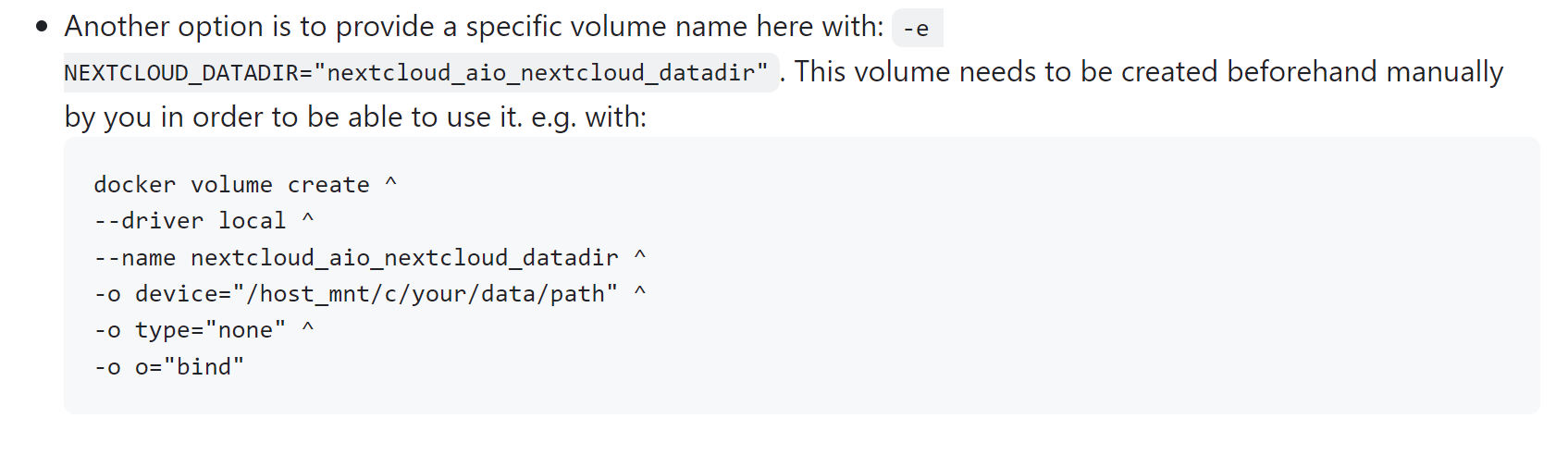
Read-Only Volumes for Enhanced Security
For applications that only need to read configuration files or static assets, use the `readonly` option. This is a vital security hardening step.
bash
docker run -d
--name webserver
--mount source=configdata,target=/etc/nginx,readonly
nginx:latest
4. Advanced Volume Drivers and Cloud Integration
By 2026, Docker’s ecosystem has fully embraced external volume plugins and drivers. Many of these advanced volume plugins leverage standards like the Container Storage Interface (CSI), allowing volumes to exist on network-attached storage (NAS), storage area networks (SAN), or cloud providers like AWS, Azure, and Google Cloud. Integrating these drivers is a crucial aspect of a comprehensive Step-by-step guide to persistent volume management in Docker, enabling true storage orchestration across diverse environments.
Why Use Volume Drivers?
Multi-Host Persistence: Standard volumes are tied to a single host. Drivers like Rook or Portworx allow data to follow the container across different nodes in a cluster, enabling true high availability (HA).
Snapshots and Backups: Many drivers integrate directly with cloud snapshots, allowing for point-in-time recovery and robust disaster recovery of application data.
Performance Scaling: Drivers can provision high-IOPS SSDs dynamically based on the container’s requirements.
Using the SSHFS Driver
For distributed teams, mounting a volume over SSH is a common use case:
bash
docker volume create --driver vibe/sshfs
-o sshcmd=user@server:/home/data
-o password=securesshpass
remotevolume
This allows your local Docker container to interact with data hosted on a completely different physical server as if it were local.
5. Lifecycle Management: Backups, Migration, and Pruning
Data that isn’t backed up is data that doesn’t exist. In 2026, automated volume lifecycle management is a requirement for any DevOps pipeline. This section of our Step-by-step guide to persistent volume management in Docker covers essential lifecycle operations.
Backing Up a Docker Volume
Since volumes are managed by Docker, you shouldn’t just copy the files from `/var/lib/docker/`. The safest way is to use a temporary container to create an archive.
bash
docker run --rm --volumes-from productiondb
-v $(pwd):/backup
ubuntu tar cvf /backup/dbbackup2026.tar /var/lib/mysql
Migrating Data Between Volumes
If you need to move data from a local volume to a high-performance cloud volume:
- Create the new volume with the desired driver.
- Use a “sidecar” container to `rsync` the data from the old volume to the new one.
- Update your container configuration to point to the new volume.
Maintaining System Hygiene
Unused volumes can quickly consume terabytes of expensive NVMe storage. Use the prune command regularly, but with caution.
bash
docker volume prune -f
Warning: This command deletes all volumes not used by at least one container. In 2026, most teams integrate this into their CI/CD cleanup scripts with specific filters to avoid accidental data loss.
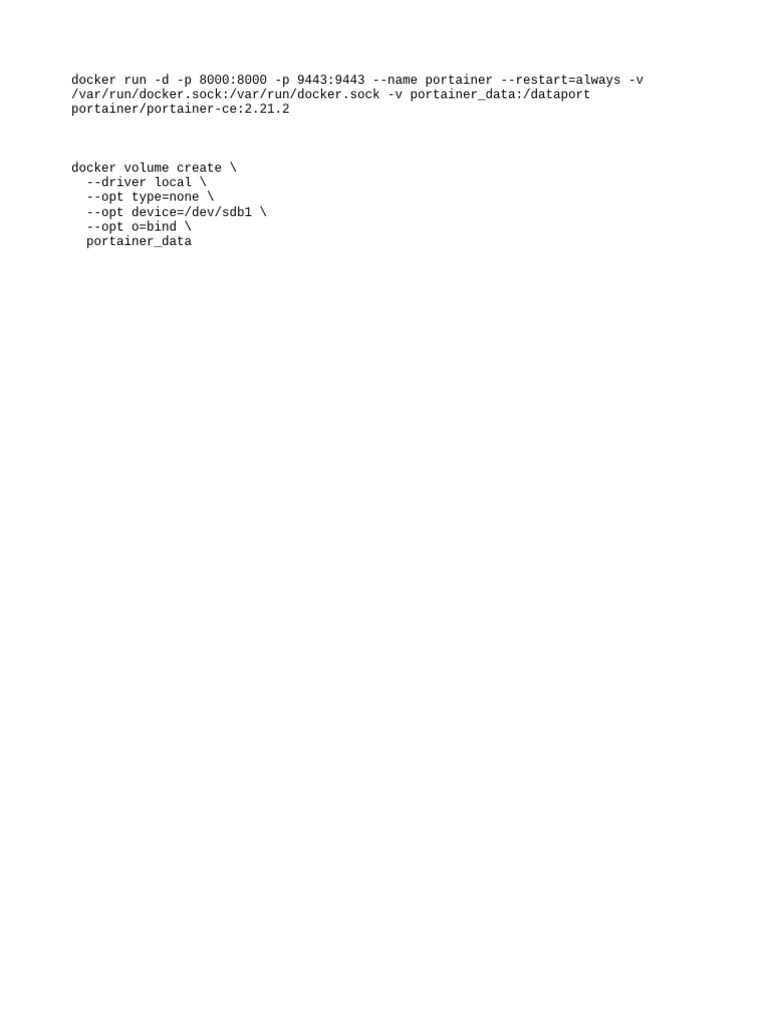
6. Docker Compose and Persistent Volumes
In a multi-container architecture, Docker Compose is the industry standard for defining volume relationships. By 2026, Compose V3.x and beyond have simplified volume definitions to be highly portable. Understanding Compose is vital for a complete Step-by-step guide to persistent volume management in Docker.
Example `docker-compose.yml` for 2026
yaml
services:
web:
image: node:22
volumes:
- applogs:/var/log/app
db:
image: postgres:17
volumes:
- dbdata:/var/lib/postgresql/data
volumes:
applogs:
driver: local
dbdata:
driver: cloudstoragedriver # Example of a 2026 cloud-native driver
Using the `volumes` key at the bottom of the file ensures that Docker creates these entities if they don’t exist, and maps them correctly across the service network.
7. Performance Optimization and Troubleshooting
To achieve maximum throughput in 2026, you must align your Docker volume configuration with your hardware. This section concludes our Step-by-step guide to persistent volume management in Docker by addressing performance and common issues.
1. I/O Scheduling
For database workloads, ensure your host machine is using the `none` or `mq-deadline` I/O scheduler if you are running on SSD/NVMe. This reduces the latency between the container’s request and the physical disk.
2. Avoiding “Bind Mount” Bottlenecks
On macOS and Windows, bind mounts often suffer from filesystem overhead due to the virtualization layer. In 2026, VirtioFS has significantly improved this, but using “Named Volumes” still provides the best performance for I/O-intensive tasks.
3. Solving Permission Denied Errors
A common headache is the mismatch between the User ID (UID) inside the container and on the host.
The 2026 Solution: Use Rootless Docker or specify the user in your Dockerfile to match the volume owner.
- Alternatively, use the `–user` flag during `docker run` to force the container to act as the host’s user.
Conclusion: The Future of State in Containerization
As we look toward the remainder of 2026 and beyond, the management of persistent volumes in Docker is becoming increasingly abstracted and automated. We are moving away from manual volume creation toward Storage-as-Code, where the requirements for persistence, redundancy, and speed are defined within the application’s manifest.
Mastering these steps ensures that your applications are not only portable but also resilient. By leveraging Named Volumes, utilizing the `–mount` syntax, and integrating cloud-native drivers, you build a foundation that can withstand container failures and host migrations without losing a single byte of critical data. This comprehensive Step-by-step guide to persistent volume management in Docker equips you with the knowledge to achieve this.
Persistent volume management is the bridge between the agility of containers and the stability of traditional infrastructure. Cross that bridge with confidence by following these 2026 best practices.